Last modified by: The Includables -
Employee Bulk Update Overview
What is Employee Bulk Update
Employee Bulk Update lets you make changes to the Payroll Instructions of multiple employees at one time. Changes that can be made using Employee Bulk Update:
- Enabling or Disabling a payroll instruction for certain employees, or for all employees
- Add or remove employee overrides
- Set up or update a payroll instruction's default value
Access to the Bulk Update tool requires certain permissions. To have the Employee Bulk Update enabled for your account, please contact an Includable.
Where can I find Employee Bulk Updates
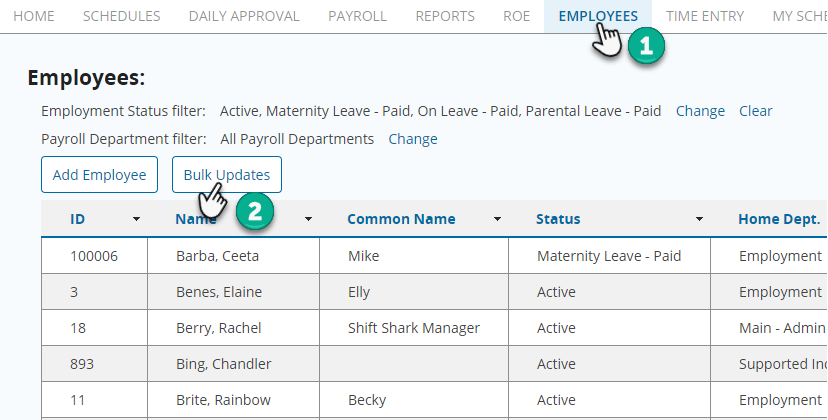
Once Bulk Updates has been set up for your account, you can find it the within the Employee module of our system.
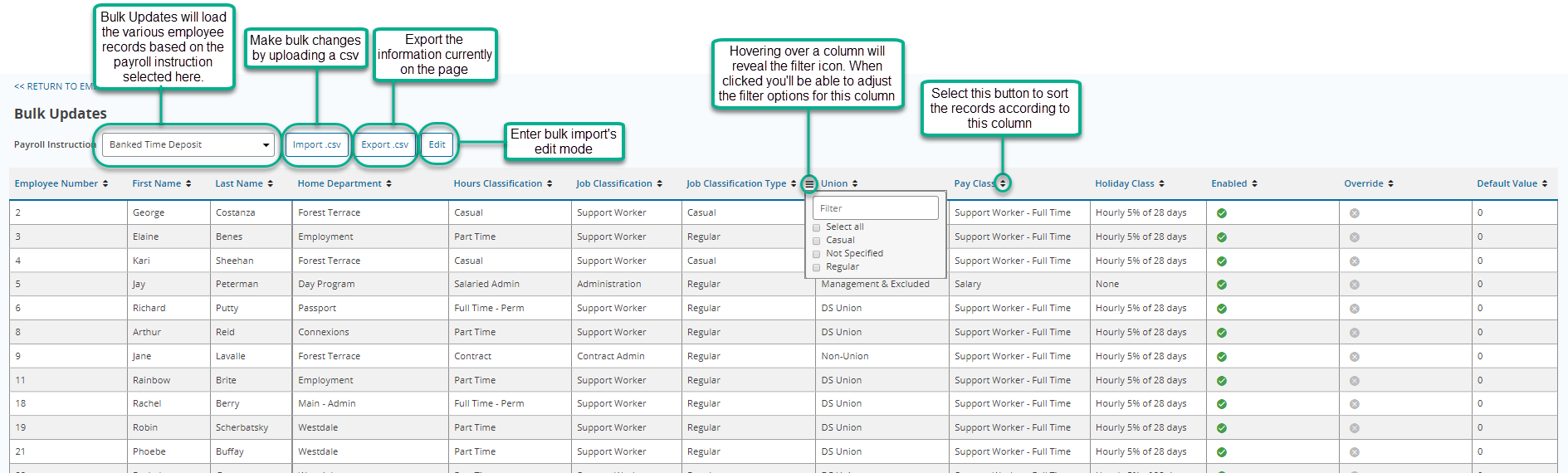
Bulk Updates Page Layout
(Click the image for an enlarged view)
How to make changes to payroll instructions
There are two methods to adjusting payroll instructions with Bulk Updates
- Bulk Updates: Adjusting payroll instructions using Edit mode
- Bulk Updates: Adjusting payroll instructions using import.csv
