Last modified by: Peregrin Maksimovich -
Adding and Editing Employee HR Records
Employee HR records can quickly be viewed, added or edited from the employee profile page. Users will only have access to the records with a combination of the appropriate security role, department permission, and HR access permission. Contact the Includables if you need assistance with setting up access.
Contents
Accessing and Viewing Records
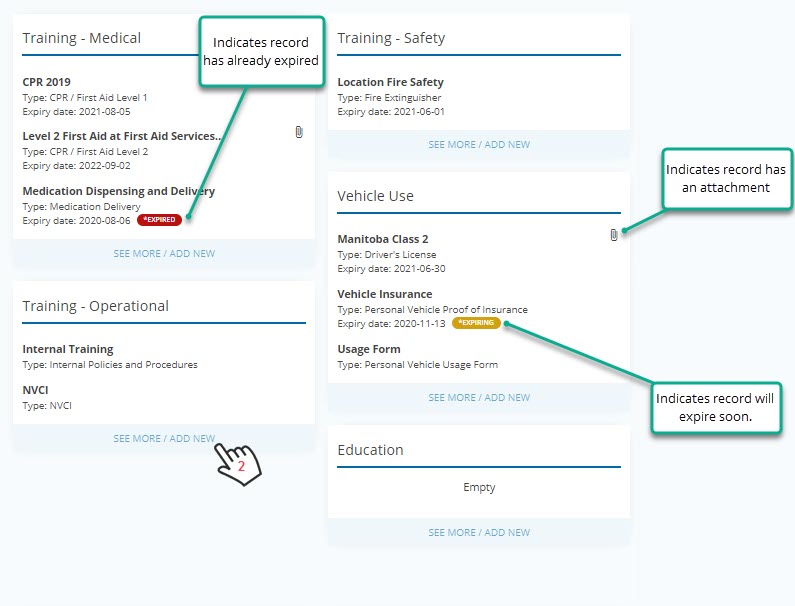
A summary view of the employee records provides the basic details of each type record in each category, and you can quickly identify those that have expired, will expire, and which contain attachments.
- Click on Go to HR on the profile page for the employee.
- Click SEE MORE / ADD NEW to fully expand a category to see all records and to

Editing and Adding Records
Within the category to add a new record click the button at the top of the of the Active page. To edit any record click Edit on the specific tile to make an adjustment.

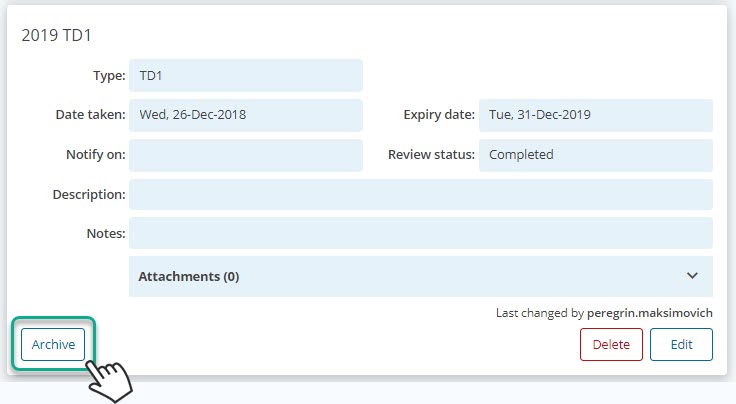
Setting a Record as Archived
When a record is no longer needed for example if it is time sensitive and will be replaced by new record of the same type it can be archived which will move it to the Archive tab for that category. This will also remove it from the expired list and reports.