Last modified by: The Includables -
BC Employee Illness or Injury Leave Calculation
This report is intended for British Columbia organizations and was created using the released legislation details as of January 1, 2022.
To learn more about the Illness or Injury Leave, click here.
Finding the Report
- In Inclusion System, click Reports on the main menu.
- Navigate to the Organization Custom Reports tab.
- A report titled BC ESA Illness Leave - BC Employee Illness or Injury Leave Calculation should appear in the list.
- If you are an organization located in British Columbia and do not see this report link, please contact our support team for assistance.
Running the Report
- Input the first day of the sick leave in the Effective As Of field.
This should be the start date of the sick leave and will be used to determine the 30 days of work that will be considered in the calculation. As per legislation, the calculation is based on the hours worked in the 30 days prior to the sick leave start.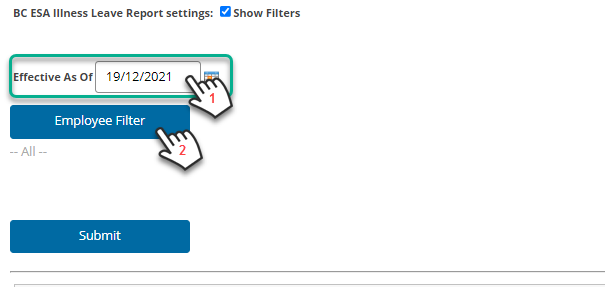
- Click the Employee Filter button to filter the report to the employee(s) of interest.
- In the Employee Filter window, double click the employee name on the left to move it to the right side. Any names in the right side box will be included in the report.
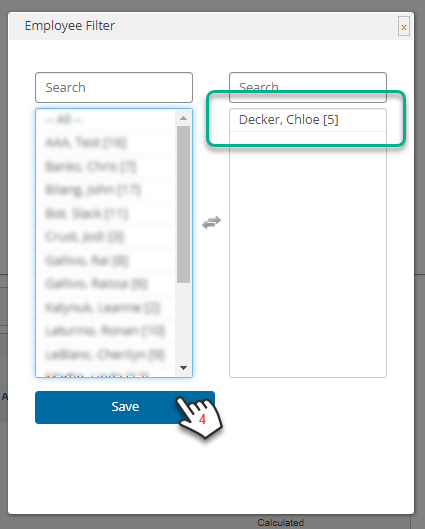
- Click Save to set the filters.
- Click Submit to run the report. The report results will be displayed in the table below.
Reading the Report

The report columns include:
- Leave Date - this is the date that was entered in the Effective As Of field, and should be the first date of the sick leave
- Employee Number - employee code assigned to the employee
- Employee Common Name - employee's first name entered in their profile
- Employee Last Name - employee's last name entered in their profile
- Employment Status - employee's status as of the effective date entered
- Employed Days - number of days the employee has been part of the organization as of the effective date entered
- Only employees who have been with the organization for 90 days are eligible for this leave.
- Only employees who have been with the organization for 90 days are eligible for this leave.
- Rate - hourly rate as of the effective date entered
- Allowable Leave Hours - this is equivalent to the calculated Allowable Leave Amount divided by the Rate (to be used if you are paying the average day's pay in hours)
- Allowable Leave Amount - calculated average day's pay based on the past 30 days prior to the effective date
- As per legislation, the average day's pay is calculated as the total wages divided by the number of days worked in the 30 days prior to the leave start
- As per legislation, the average day's pay is calculated as the total wages divided by the number of days worked in the 30 days prior to the leave start
- Status - There are 3 statuses that may appear in this column
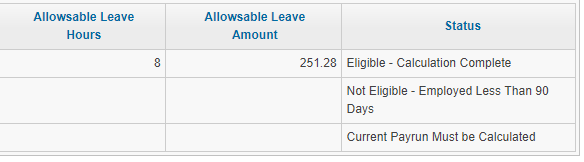
- Eligible - Calculation Complete - employee has been employed for at least 90 days and the pay period which includes the effective date has been processed, therefore, an average day's pay has been calculated and appears under Allowable Leave Amount
- Not Eligible - Employed Less Than 90 Days - employee has not been employed for 90 days and is not eligible, therefore no Allowable Leave Amount calculation will be provided
- Current Payrun Must be Calculated - the pay period which includes the effective date has not been calculated, no Allowable Leave Amount calculation will be provided until the payrun is processed
- Eligible - Calculation Complete - employee has been employed for at least 90 days and the pay period which includes the effective date has been processed, therefore, an average day's pay has been calculated and appears under Allowable Leave Amount
To correct this status, do the following:
-
-
- Leave the report and calculate the input sheet which contains the effective date, but do not approve.
- Return to the BC Employee Illness or Injury Leave Calculation report and run it to find the Allowable Leave Amount for the employee
- Return to the input sheet, modify it, and add the sick pay payment (Allowable Leave Amount) added to the employee
-
